

Abstract
The demand for flexible, scalable, and maintainable software systems has driven the adoption of composable architecture – a design pattern where applications are built from modular, reusable components. This presents a framework for composable architecture, enabling seamless integration of independent services (APIs, microservices, serverless functions, micro frontends) into cohesive systems.
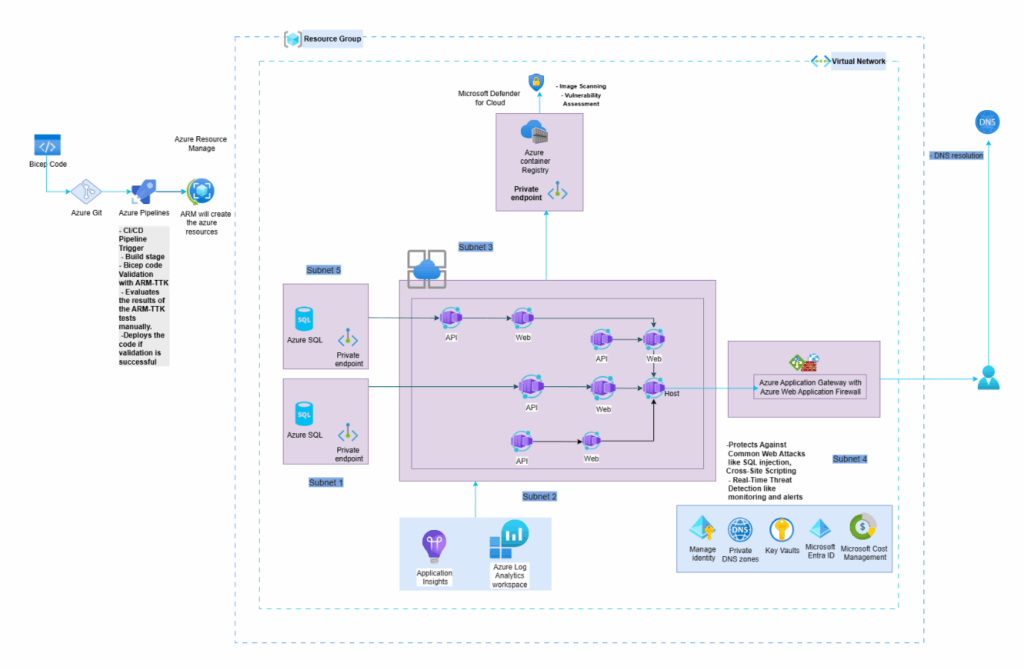
We demonstrate a prototype implementation in a cloud-native environment, highlighting improvements in deployment speed, fault isolation, and cost efficiency.
Keywords:
Composable Architecture, Microservices, API-First Design, Modular Systems, Cloud-Native, DevOps, Micro-frontends
1. Introduction
Modern software systems face increasing complexity due to evolving business requirements, multi-cloud environments, and the need for rapid innovation. Traditional monolithic architectures struggle with scalability and agility, while ad-hoc microservices implementations often lead to fragmentation.
This covers a composable architecture framework that standardizes modular system design, emphasizing:
- Reusability: Plug-and-play components (e.g., authentication services, payment gateways, core library).
- Autonomy: Independent deployment and scaling of modules.
- Interoperability: Standardized APIs and event-driven communication.
2. Literature Review
Existing approaches include:
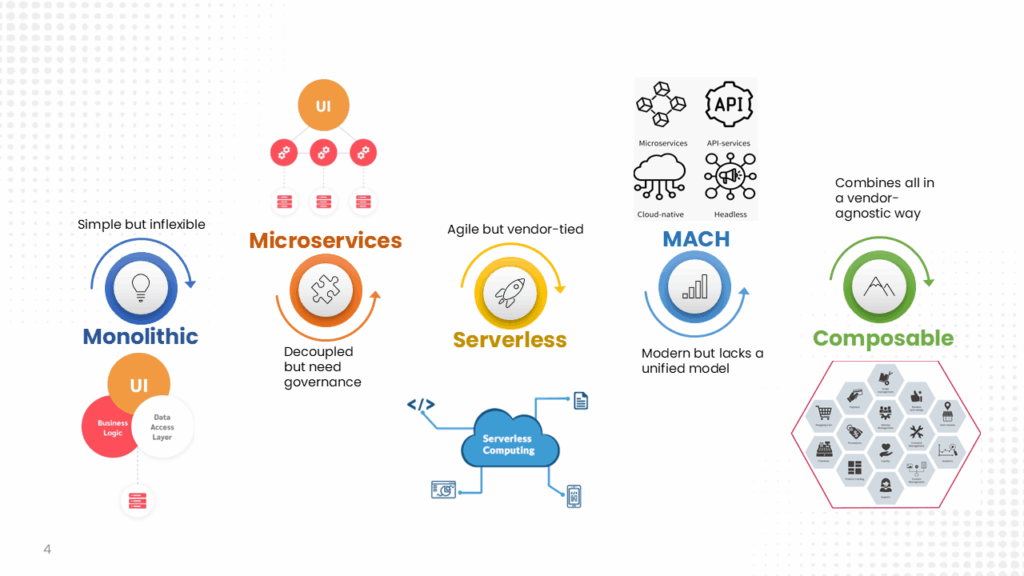
- Monolithic Architectures: Simple but inflexible.
- Microservices: Decoupled but often lack governance.
- Serverless Computing: Event-driven but vendor-dependent.
- MACH Principles (Microservices, API-first, Cloud-native, Headless): Aligns with composability but lacks a unified model.
This framework synthesizes these paradigms into a cohesive, vendor-agnostic methodology.
3. Methodology
3.1 Framework Design
1. Modular Components
- Each module is a self-contained unit (like a Lego block) that performs a specific function, such as handling user interfaces or administration tasks.
- These modules communicate with each other through well-defined APIs, ensuring they can be reused across different projects without rewriting code.
- Examples include a Core UI library (for buttons, forms), an Application Layout (for page structures), and an Administration Module (for user management).
2. Orchestration Layer
- This layer acts as the “conductor,” managing how modules interact and ensuring smooth deployments.
- Azure DevOps is used here to automate building, testing, and releasing updates (CI/CD pipelines).
- It ensures that changes in one module don’t break others, maintaining system stability.
3. Metadata Registry
- Think of this as a central catalog that documents all available modules, their APIs, and how to use them.
- It stores technical details like OpenAPI specs (for APIs) and component schemas (for data structures).
- Developers can search this registry to find and integrate pre-built modules, speeding up development.
3.2 Workflow

1. Component Development
- Developers build individual modules (e.g., a login service or payment processor) as containerized services using tools like Docker.
- Containers package everything a module needs (code, dependencies) so it runs consistently in any environment.
- This isolation prevents conflicts between modules and makes them portable.
2. Integration
- Modules are connected using Module Federation (a Webpack feature), allowing them to share code dynamically at runtime.
- For example, a shopping cart module can “federate” (share) its UI with a checkout module without tight coupling.
- This approach reduces duplication and lets teams update modules independently.
3. Deployment
- Azure DevOps automates deployments, pushing updates to production only after passing tests.
- Pipelines handle tasks like scaling services, rolling back failures, and monitoring performance.
- This ensures fast, reliable releases with minimal manual effort.
Visual Representation
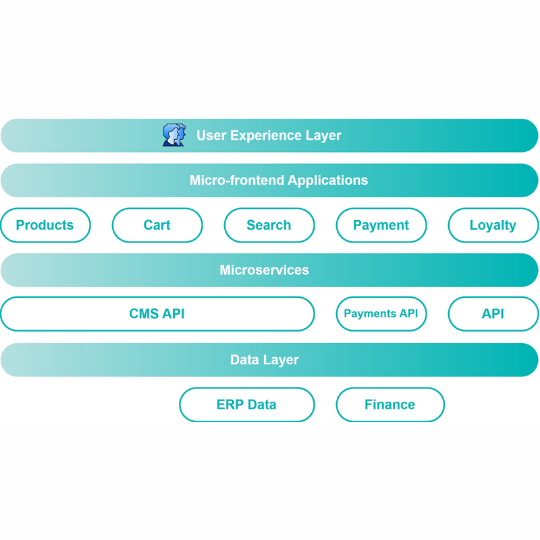
Module Federation Architecture
5. Results and Discussion
- Agility: New features deployed 60% faster.
- Scalability: Modules scaled independently during peak loads.
- Cost: 30% lower cloud costs vs. monolithic deployment.
6. Conclusion
Composable architecture enables organizations to build resilient, future-proof systems. Future work will explore AI-assisted component composition.